Compatible Lexmark 58D1H00 Toner: Reliable Enterprise Solution
source: Time:2026-11-12 views:3
Compatible Lexmark 58D1H00 Toner for Enterprise: A Practical Guide to Stable Supply in High-Volume Offices
Buying toner for a fleet of Lexmark MS725 or MS820-series printers is not the same as grabbing a cartridge for the machine by your desk. The original 58D1H00 is a high-yield Return Program cartridge, and the price reflects that. A compatible replacement can cut the cost significantly — but the word "compatible" carries a lot of weight, and not all of it is earned. So before you approve a volume order, it's worth building a process around fit, testing, and replenishment rather than trusting the label.
The original Lexmark cartridge is rated for up to 15,000 standard pages under ISO/IEC 19752 conditions, and Lexmark lists the specific devices it supports. Those figures are a useful benchmark. They do not prove how any replacement will perform in your office, on your documents, with your printers. Treat them as a starting assumption, not a guarantee.
For enterprise procurement, "enterprise-ready" should mean something you can measure: an exact model match, acceptable output on representative jobs, clear replacement support, and a replenishment arrangement your team can actually manage. Approve the supplier's specific product — not every cartridge that happens to share the same reference number.
Region matters too. Lexmark lists 58D1H00 for the United States and Canada, with different part numbers elsewhere. If you're buying for imported equipment or a multinational footprint, ask the supplier to confirm the printer's region as well as its model.
For each device group, keep a short approval record:
Full printer model, location, asset number, installed firmware version
A photo of the current cartridge label, with the part number verified against printer documentation
The supplier SKU and product description, so repeat orders reference the same item
Written confirmation that the replacement supports the exact configuration, including any firmware limitations
A named person who handles recognition errors, fit problems, or unexpected output before you order in volume
If you're evaluating a compatible cartridge for MS725 equipment, specify the full MS725dvn model in your inquiry. Lexmark identifies that configuration on its original cartridge's supported-device list. Use that as a starting point, then verify the replacement itself.
When you evaluate, pick a representative mix: invoices with logos, dense reports, routine correspondence, forms. Don't judge the cartridge on a single short text page if most of your production work carries heavier graphics. Keep the test settings consistent so the comparison stays useful.
Record installation and replacement meter readings, why the cartridge came out, and any rejected pages. Separate a cartridge that ran empty from one pulled for a quality issue. Those records let you set a conservative planning yield for your own workload — instead of promising every department the advertised maximum.
Set a reorder point from actual consumption:
Reorder point = expected consumption during replenishment lead time + safety stock.
Calculate lead time from order approval through receipt at the office, not just the shipping estimate. Choose safety stock based on how critical the printers are, how variable delivery has been, and what's coming up on the calendar. Revisit the calculation when usage or delivery performance changes.
A simple example: if an office expects to use two cartridges while an order is being approved and delivered, and keeps one more as a buffer, the reorder point is three unopened cartridges. That illustrates the method — it's not a recommendation for every fleet. Set your own threshold from your own records.
In your replenishment routine:
Check stock on a set schedule, with a backup owner for holidays and absences
Record withdrawals immediately — note the destination printer or department, not just the quantity
Review upcoming demand, including scheduled reporting runs, onboarding, and other known print-heavy work
Escalate delayed orders early, before the remaining buffer is committed
Clarify support before approving the purchase. What evidence is required for a recognition or print-quality complaint? Who pays return shipping? Does a replacement ship before the disputed cartridge is received? Get the terms in writing rather than assuming all Lexmark printer supplies carry equivalent support.
Use a comparison sheet with these fields:
Product identity — supplier SKU, condition, exact supported models
Delivered cost — cartridge charge plus shipping and fees
Supply commitment — allocated quantity, expected dispatch, exception process
Support — claim steps, replacement timing, return obligations
Pilot results — usable output, rejected pages, staff intervention
For an internal comparison, divide delivered cartridge cost by usable pages from your trial. Record troubleshooting time separately so purchasing can assess operational effort without inventing a precise savings claim. A lower quoted price should pass the same acceptance checks as any other offer.
Test before you roll out
Test a small order on representative printers before approving fleet-wide purchasing. Define acceptable output, normal installation behavior, and the evidence needed to approve or reject the cartridge. Keep the trial bounded so one successful installation does not become an unsupported assumption about every device.
A documented sequence helps:
Capture a baseline. Save sample output and record the printer's starting condition and settings.
Install per instructions. Record the cartridge SKU, installation date, and any device messages.
Run normal work. Include documents staff actually distribute or archive, using ordinary print settings.
Inspect and log results. Note text readability, unwanted marks, rejected pages, and interventions.
Approve by configuration. Record which printer models passed and what remains untested.
Lexmark cautions that third-party supplies may affect performance and that supply-life indicators may behave unpredictably with them. Include device messages and supply reporting in your review rather than evaluating appearance alone. Keep the manufacturer's guidance distinct from your own trial findings.
Set escalation rules too. If a problem appears, record the message and sample output, then follow printer documentation and supplier instructions. Avoid making unapproved configuration changes simply to complete the trial.
Buying toner for a fleet of Lexmark MS725 or MS820-series printers is not the same as grabbing a cartridge for the machine by your desk. The original 58D1H00 is a high-yield Return Program cartridge, and the price reflects that. A compatible replacement can cut the cost significantly — but the word "compatible" carries a lot of weight, and not all of it is earned. So before you approve a volume order, it's worth building a process around fit, testing, and replenishment rather than trusting the label.
Start with the uncomfortable distinction
A compatible 58D1H00 is a third-party replacement. It is not manufactured or tested by Lexmark. That's not a reason to reject it outright, but it is a reason to keep the lines clear when you compare product descriptions, write purchasing approvals, and decide who owns a problem if one appears.The original Lexmark cartridge is rated for up to 15,000 standard pages under ISO/IEC 19752 conditions, and Lexmark lists the specific devices it supports. Those figures are a useful benchmark. They do not prove how any replacement will perform in your office, on your documents, with your printers. Treat them as a starting assumption, not a guarantee.
For enterprise procurement, "enterprise-ready" should mean something you can measure: an exact model match, acceptable output on representative jobs, clear replacement support, and a replenishment arrangement your team can actually manage. Approve the supplier's specific product — not every cartridge that happens to share the same reference number.
Confirm the fit before you order anything
Begin with the complete printer model, including the suffix. Lexmark's original compatibility list includes the MS725dvn, MS821dn, MS821n, MS822de, MS823dn, MS823n, MS825dn, and MS826de, along with certain MX configurations. "MS series" is not a model number. It won't protect you from a wrong order.Region matters too. Lexmark lists 58D1H00 for the United States and Canada, with different part numbers elsewhere. If you're buying for imported equipment or a multinational footprint, ask the supplier to confirm the printer's region as well as its model.
For each device group, keep a short approval record:
Full printer model, location, asset number, installed firmware version
A photo of the current cartridge label, with the part number verified against printer documentation
The supplier SKU and product description, so repeat orders reference the same item
Written confirmation that the replacement supports the exact configuration, including any firmware limitations
A named person who handles recognition errors, fit problems, or unexpected output before you order in volume
If you're evaluating a compatible cartridge for MS725 equipment, specify the full MS725dvn model in your inquiry. Lexmark identifies that configuration on its original cartridge's supported-device list. Use that as a starting point, then verify the replacement itself.
Page yield is a planning number, not a promise
Use the published yield to begin your forecast. Then replace that assumption with what you actually see in the office. Suppliers typically state that a compatible cartridge's estimated yield comes from the corresponding OEM rating, and that actual output varies with document coverage, settings, printer condition, and environment. Many also state plainly that Lexmark has not tested the compatible cartridge. Read that sentence twice.When you evaluate, pick a representative mix: invoices with logos, dense reports, routine correspondence, forms. Don't judge the cartridge on a single short text page if most of your production work carries heavier graphics. Keep the test settings consistent so the comparison stays useful.
Record installation and replacement meter readings, why the cartridge came out, and any rejected pages. Separate a cartridge that ran empty from one pulled for a quality issue. Those records let you set a conservative planning yield for your own workload — instead of promising every department the advertised maximum.
Build stable supply around a reorder process
For compatible 58D1H00 toner in enterprise use, stable supply should be a purchasing objective, not an assumed product feature. Decide who monitors stock, what triggers an order, and how delivery exceptions get handled. Treat supplier availability as something to confirm for each purchasing arrangement — especially before a large rollout.Set a reorder point from actual consumption:
Reorder point = expected consumption during replenishment lead time + safety stock.
Calculate lead time from order approval through receipt at the office, not just the shipping estimate. Choose safety stock based on how critical the printers are, how variable delivery has been, and what's coming up on the calendar. Revisit the calculation when usage or delivery performance changes.
A simple example: if an office expects to use two cartridges while an order is being approved and delivered, and keeps one more as a buffer, the reorder point is three unopened cartridges. That illustrates the method — it's not a recommendation for every fleet. Set your own threshold from your own records.
Make inventory visible across locations
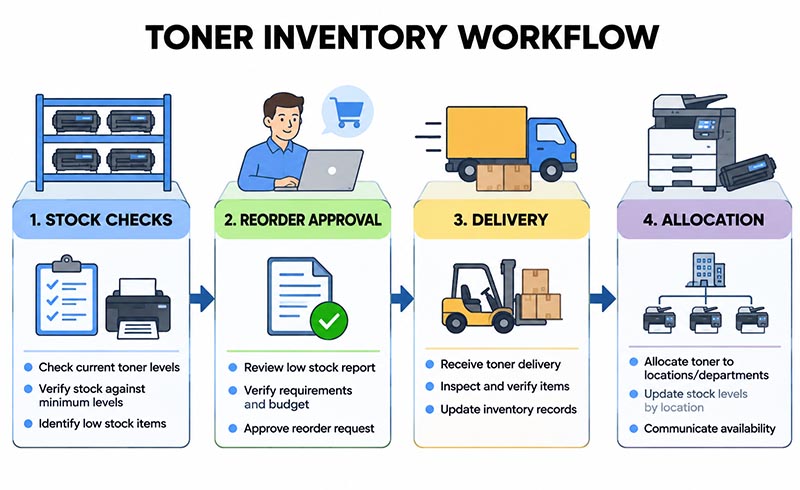
In your replenishment routine:
Check stock on a set schedule, with a backup owner for holidays and absences
Record withdrawals immediately — note the destination printer or department, not just the quantity
Review upcoming demand, including scheduled reporting runs, onboarding, and other known print-heavy work
Escalate delayed orders early, before the remaining buffer is committed
Compare the supplier offer, not just the cartridge price
Ask for a written quote that identifies the specific 58D1H00 product, quantity, delivery destination, and shipping charges. Ask which quantities are available for allocation and which depend on later replenishment. A general "in stock" statement is not the same as a confirmed commitment for your order.Clarify support before approving the purchase. What evidence is required for a recognition or print-quality complaint? Who pays return shipping? Does a replacement ship before the disputed cartridge is received? Get the terms in writing rather than assuming all Lexmark printer supplies carry equivalent support.
Use a comparison sheet with these fields:
Product identity — supplier SKU, condition, exact supported models
Delivered cost — cartridge charge plus shipping and fees
Supply commitment — allocated quantity, expected dispatch, exception process
Support — claim steps, replacement timing, return obligations
Pilot results — usable output, rejected pages, staff intervention
For an internal comparison, divide delivered cartridge cost by usable pages from your trial. Record troubleshooting time separately so purchasing can assess operational effort without inventing a precise savings claim. A lower quoted price should pass the same acceptance checks as any other offer.
Test before you roll out
Test a small order on representative printers before approving fleet-wide purchasing. Define acceptable output, normal installation behavior, and the evidence needed to approve or reject the cartridge. Keep the trial bounded so one successful installation does not become an unsupported assumption about every device.
A documented sequence helps:
Capture a baseline. Save sample output and record the printer's starting condition and settings.
Install per instructions. Record the cartridge SKU, installation date, and any device messages.
Run normal work. Include documents staff actually distribute or archive, using ordinary print settings.
Inspect and log results. Note text readability, unwanted marks, rejected pages, and interventions.
Approve by configuration. Record which printer models passed and what remains untested.
Lexmark cautions that third-party supplies may affect performance and that supply-life indicators may behave unpredictably with them. Include device messages and supply reporting in your review rather than evaluating appearance alone. Keep the manufacturer's guidance distinct from your own trial findings.
Set escalation rules too. If a problem appears, record the message and sample output, then follow printer documentation and supplier instructions. Avoid making unapproved configuration changes simply to complete the trial.